Building & Operationalizing Secure AI
CYB-4203/6203: Secure and Trustworthy AI
Units 10.3, 10.4, 10.5 — Wednesday, April 22, 2026
Dallas Elleman — Spring 2026
Unit 10 is the "HOW" of the course. 10.4 is the anchor of today's session — the four
levers of guardrail design. 10.3 opens as a short setup (context engineering and its security
implications); 10.5 closes with a short operational wrap. The final-project spec is the last
beat of class.
Course Orientation
Section 3 — HOW
Last session — Pres 19
Red-Teaming AI Systems
How to break AI/ML systems
→
Today — Pres 20
Building & Operationalizing Secure AI
How to protect AI/ML systems
Focus: LLMs / Agentic Systems
Pres 19 put on the attacker's hat; today we put on the builder's. Same systems, opposite lens.
The focus narrows from general AI/ML to LLMs and agentic systems — that's where the
operational security frontier is in 2026, and it's where the final project lives.
LLM Context Engineering & Security
Unit 10.3
Short section — goal is to set up 10.4. The key move: reframe "context engineering"
from a capability story to a security story. Every method that expands what the model can
read also expands the attack surface.
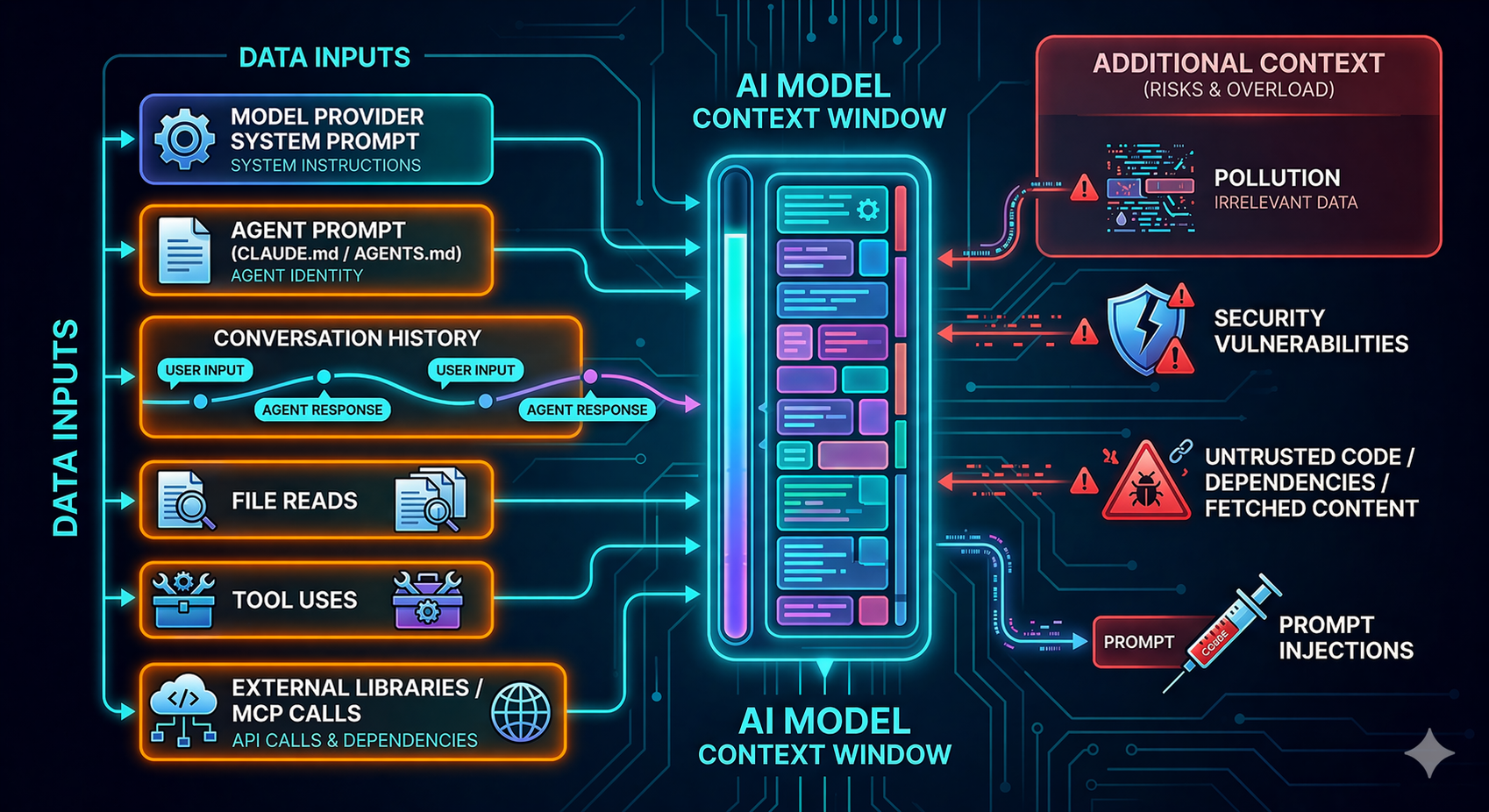
Context Window = Trust Blender
The core framing for the section. An LLM's context window is a single bucket of tokens.
The system prompt, the user's request, a retrieved document, a tool response, a scraped
webpage — they all land in the same stream. The model has no reliable way to tell
which bytes are trusted instructions and which are attacker-controlled data. Everything
in the window gets blended into one reasoning context. That is the root cause of nearly
every prompt injection vulnerability in the field.
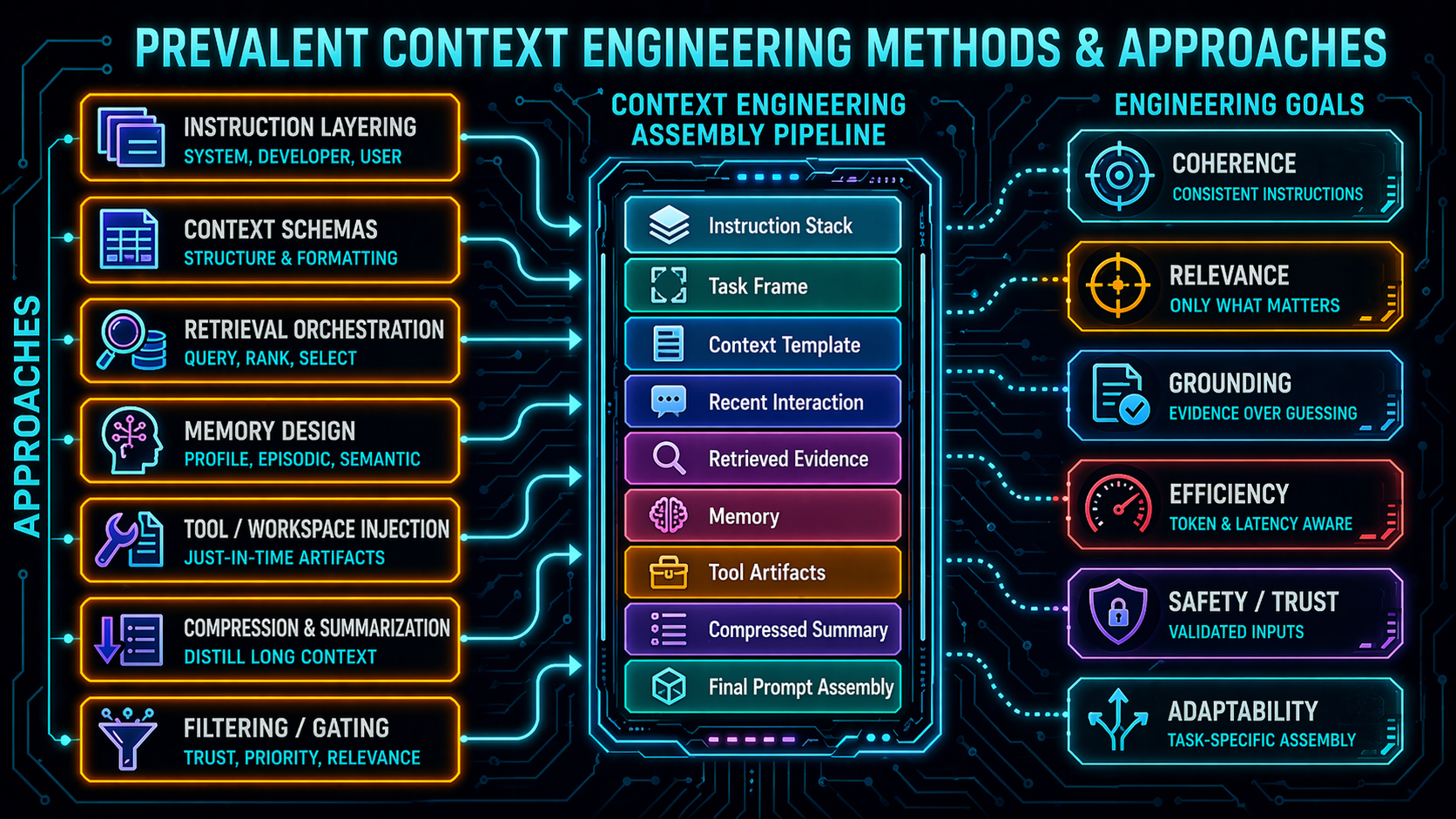
Context Engineering Methods & Approaches
Orient students to the space: RAG, vector stores, long context windows, memory systems,
compaction, structured context assembly. Each is a capability lever — and each
expands the set of inputs the LLM treats as potentially authoritative. We'll dig into
RAG specifically on the next few slides; the rest are pointers for depth.
Why Context Engineering Is a Security Topic
Context engineering methods such as RAG, vector stores, compaction and memory improve LLM/agentic capabilities .
From a security standpoint, each expands the set of inputs that LLMs treat as potentially authoritative.
LLMs can't reliably distinguish between trusted and untrusted content on their own.
The three-beat argument. Capability first — don't caricature context engineering as
reckless. It's genuinely useful. Then the security consequence: more context = more
authoritative-feeling input for the model. Then the structural gap: the model is not a
trust boundary and never will be. This is the thesis that justifies every control we
cover in 10.4.
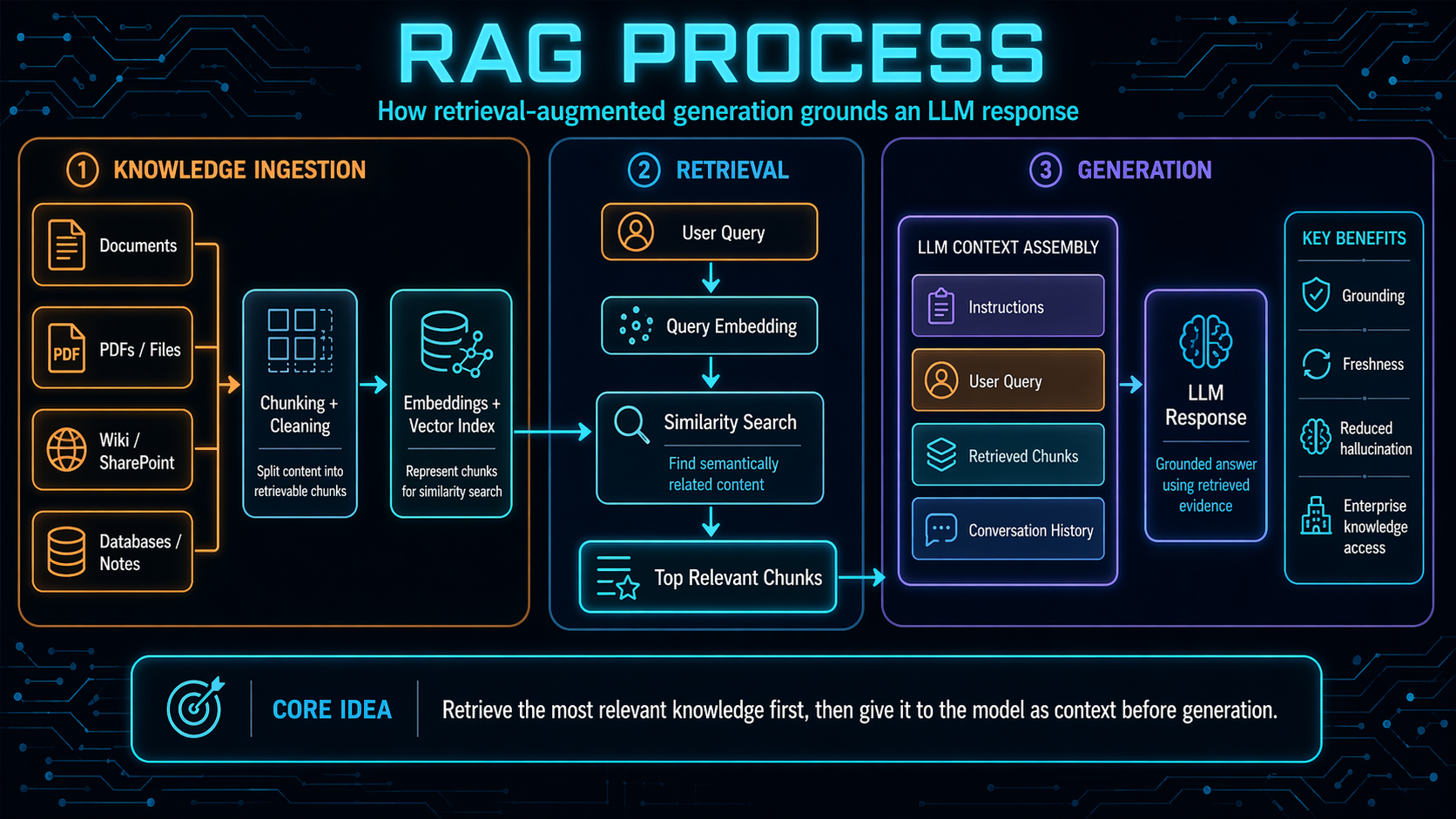
Retrieval-Augmented Generation (RAG)
User query → vector retrieval from a document store → retrieved chunks injected into the prompt → grounded answer.
Quick refresher in case anyone needs it. RAG is the most common context-engineering pattern
in production today. The user's query gets embedded, nearest-neighbor chunks are pulled
from a vector store, and those chunks are concatenated into the prompt before the model
generates. The pitch: the model's answers are grounded in your documents instead of its
training data. The catch: whatever is in those documents is now in the context window.
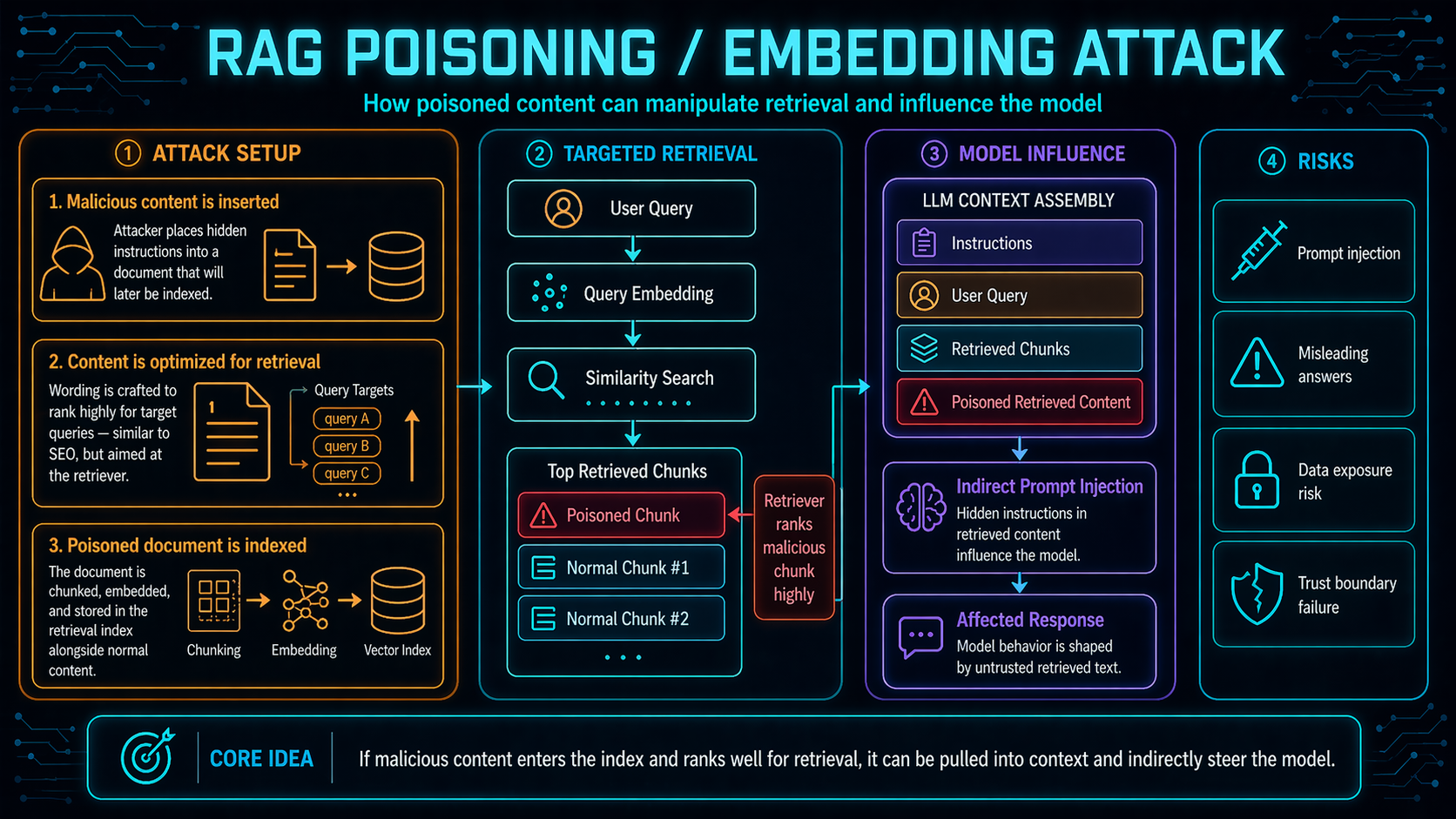
RAG Poisoning / Embedding Attack
An attacker plants crafted content into the corpus — when retrieved, it becomes part of the model's prompt.
The RAG-specific attack class. If an attacker can get content into the corpus —
through a public wiki, a shared drive, a user-uploaded document, a scraped webpage —
then at retrieval time that content is concatenated with the system prompt and the user's
request. The model treats it as authoritative context. From there you have the full
prompt-injection toolkit: exfiltration, instruction override, tool misuse. This is how
the EchoLeak chain starts, and it's the attack pattern the rest of the section is
designed to contain.
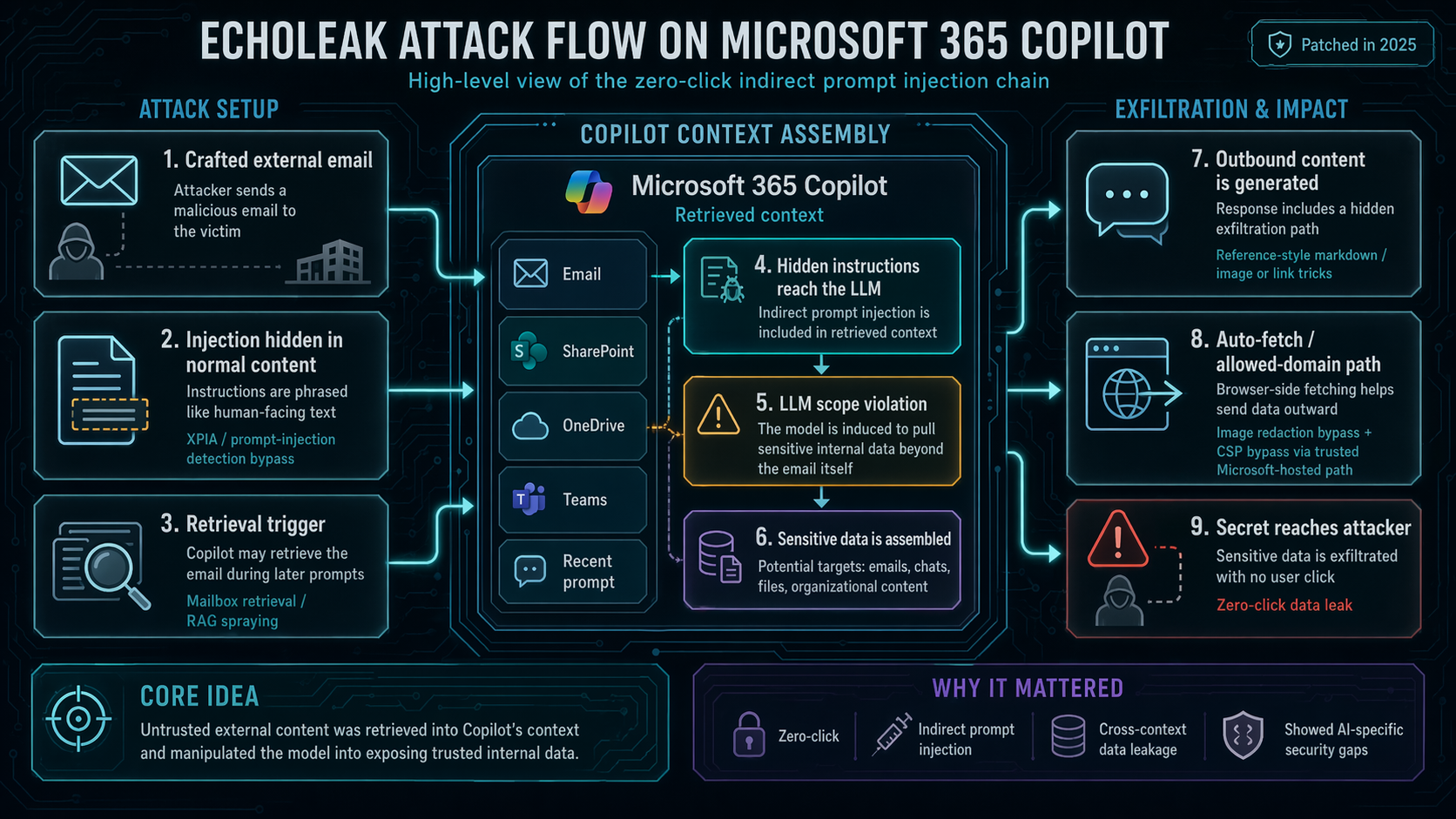
Case Study: EchoLeak / CVE-2025-32711
First publicly-disclosed zero-click prompt injection against a production
LLM system — Microsoft 365 Copilot. A single crafted email to a user caused Copilot
to exfiltrate internal data with zero user interaction .
1
XPIA classifier bypass — prompt written as if aimed at a human, not an LLM, sneaking past the cross-prompt-injection-attack filter.
2
Reference-style Markdown to evade link redaction — the exfil URL was hidden in a reference definition rather than an inline link.
3
Teams-proxy image URL allowed by the content-security policy — the channel that actually exfiltrated the data out.
EchoLeak is the set-piece case study for the whole day. It's the first production-scale
zero-click prompt injection and it compounds three defensive failures: a classifier that
was trained to detect human-readable jailbreaks rather than LLM-targeted prompts; a link
redactor that only handled inline Markdown; and a CSP allowlist that included a
Microsoft-internal proxy capable of carrying arbitrary query strings. No single control
saved the system. When we introduce the Lethal Trifecta and the Rule of Two in 10.4,
circle back to this slide — EchoLeak is a textbook trifecta exploit.
Case Study: EchoLeak — Exploit Chain
Crafted email → retrieval into Copilot's context → classifier bypass → Markdown-hidden link → Teams-proxy exfil.
Visual anchor for the exploit. The single important thing to point at: the exfiltration
channel is not exotic — it's just an image embed that the user's Outlook/Teams client
happily loads. The attack doesn't require any action from the victim. That is what
"zero-click" means, and that is why defense has to be architectural rather than
user-training.
Guardrails and Defensive Mechanisms
Unit 10.4
The anchor section of the day. If 10.3 was the diagnosis, 10.4 is the treatment plan.
The goal: leave students with a concrete mental checklist for every AI system they build,
audit, or red-team.
What Are Guardrails?
Safety, security, and compliance constraints applied to Large Language Model inputs and outputs to prevent harmful, biased, or inappropriate behavior.
Use rule-based or AI-assisted checks to filter user prompts, data inputs, and model responses.
Absolutely essential for production systems in regulated industries.
Plain working definition. "Guardrail" is used loosely in the industry — sometimes a
safety classifier, sometimes an entire pipeline. For this unit, we treat guardrails as the
full set of constraints (rule-based or model-based) applied at any stage around an LLM to
bound its inputs, outputs, and actions. Emphasize regulated industries: healthcare, finance,
legal — this isn't optional.
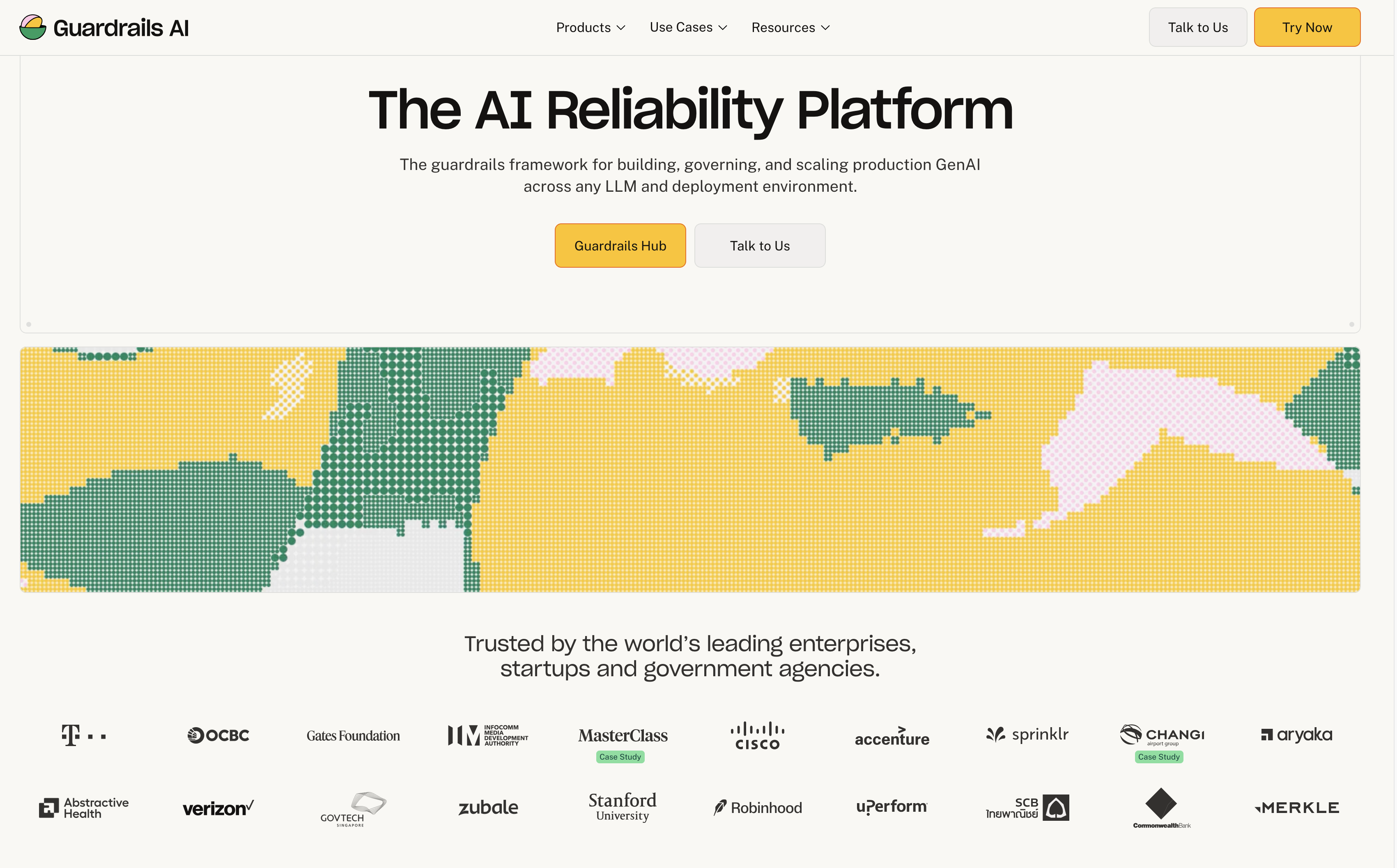
Types of Guardrails
guardrailsai.com
Guardrails AI's catalogue is the cleanest visual survey of the guardrail categories in
production today — PII, toxicity, jailbreak, prompt injection, structured output,
hallucination, and dozens more. Not an endorsement of the tool specifically; it's a useful
taxonomy regardless of which stack a team actually uses.
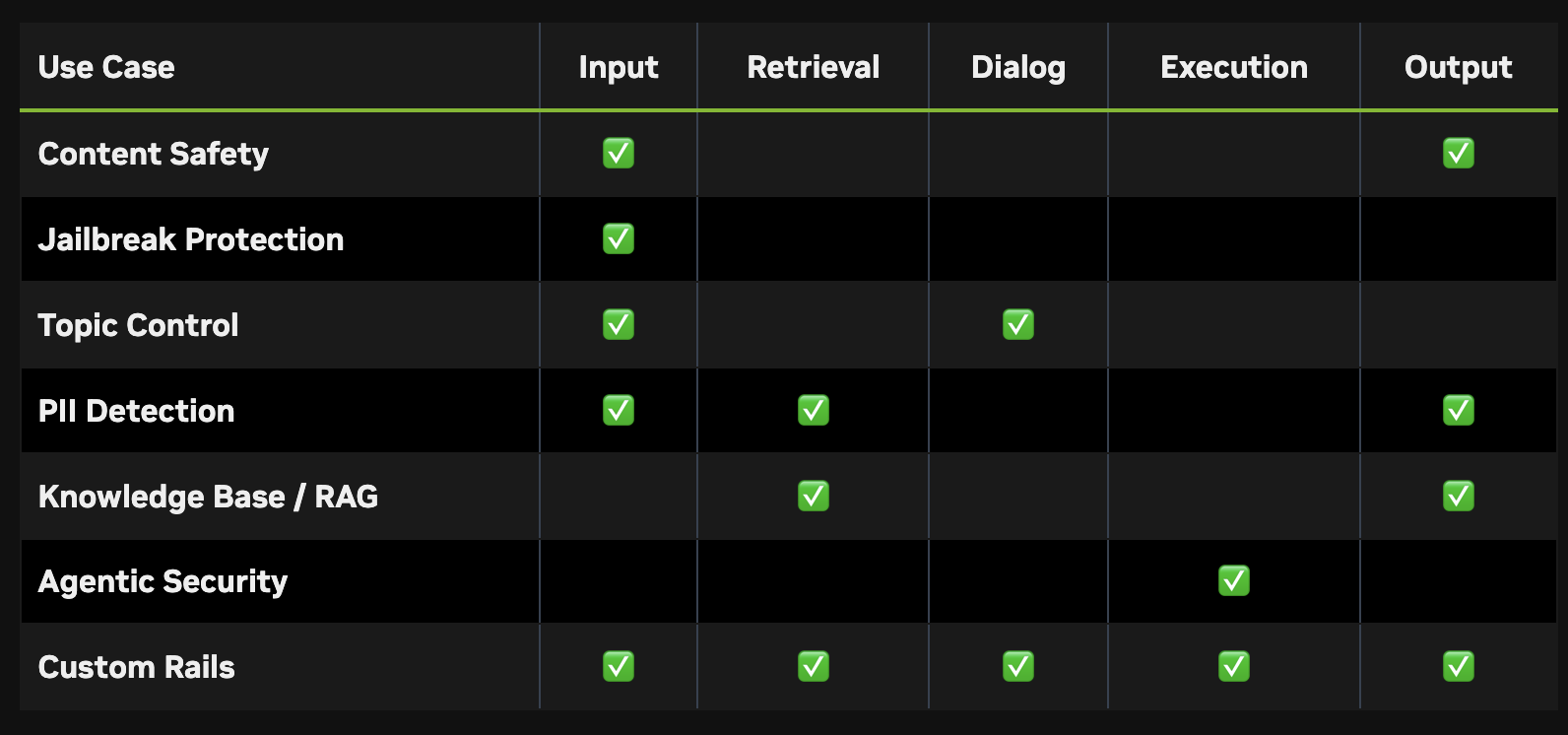
More Types of Guardrails — NVIDIA NeMo
developer.nvidia.com/nemo-guardrails
NVIDIA NeMo Guardrails is the other well-known open-source guardrail framework. Similar
category list to Guardrails AI but with a different architecture — NeMo uses a
domain-specific language (Colang) to script dialogue-flow rails, whereas Guardrails AI is
Python-native with typed validators. Knowing both helps students compare design choices.
Where Do Guardrails Go?
Input stage
Validate, classify, and sanitize prompts before they reach the model.
Retrieval / context stage
Enforce access on documents, filter tool responses, tag provenance.
Model stage
Safety-tuned models, conservative sampling, system-prompt hardening, token limits.
Tool-call / action stage
External authorization, per-action policy, approval gating.
Output stage
Content moderation, PII detection, structural validation, hallucination checks.
Execution stage
If the model produces code or actions, run them inside a sandbox.
Monitoring stage
Log everything, detect anomalies, trigger incident response.
The pipeline framing. No single "safety layer" is enough — mature deployments have
controls at every stage. The airport-security metaphor holds: ID check, metal detector,
baggage scan. Each layer catches a different class of problem. Students should be able to
name these seven stages from memory.
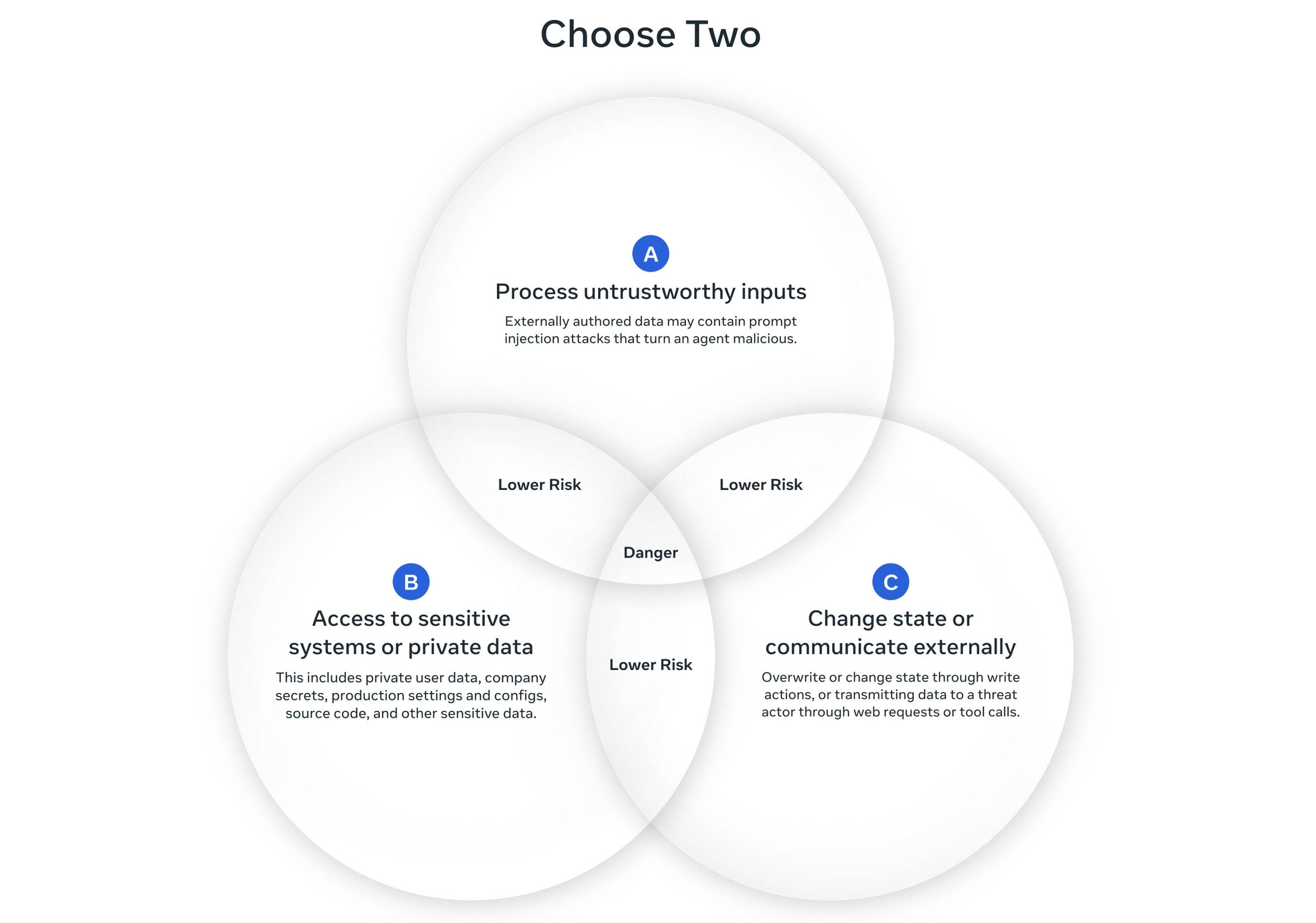
Restricted Permissions: Meta's Agents Rule of Two
An AI agent should satisfy at most two of the following three properties in a single session:
A
Processes untrusted inputs .
B
Has access to sensitive systems or private data .
C
Can change state or communicate externally .
If all three are required for a task, the agent must restart the session or require human-in-the-loop approval before acting.
Rule of Two is the most practical defensive framework the field has produced in the past year.
It's a minimum architectural bar, not a sufficiency guarantee — Meta themselves replaced
"safe" with "lower risk" in their graphic after feedback. But as a starting constraint, it's
the closest thing to a sensible industry standard we have. Circle back to EchoLeak: that
exploit had all three — untrusted email (A) + private OneDrive/Teams data (B) + Teams
proxy outbound (C). Trifecta.
simonwillison.net/2025/Nov/2/new-prompt-injection-papers
The updated Meta diagram — note the caption change from "safe" to "lower risk." That
edit is itself a teaching moment: defensive frameworks constrain attack surface, they don't
prove safety. Willison's review is the easiest entry point to the annotated version.
Meta's Agents Rule of Two — Examples
Travel assistant
A (web) + B (user data) allowed, but C (booking/payment) is gated behind human confirmation and restricted to URLs from trusted sources.
Browser research agent
A (web) + C (arbitrary requests) allowed, but B is eliminated by running in a session-free sandbox with no preloaded credentials.
Engineering agent
B (production access) + C (stateful changes) allowed, but A is controlled by filtering to trusted data sources via author-lineage.
Three worked examples from Meta's own post. The pedagogy: see Rule of Two used as a design
tool, not a compliance check. In each case, the architect picked two properties and then
did architectural work to eliminate the third — human confirmation, session-free
sandbox, trust lineage. That is how you apply the rule in practice.
Output Filtering (1 of 2)
Assume the model will produce something unsafe eventually, and design for it.
Structural validation
Pydantic schemas, JSON schema validation. Catches malformed output before it crashes downstream systems. (Usually the most common real failure mode.)
Content moderation
Toxicity, hate speech, self-harm, NSFW — via purpose-built classifiers (e.g., Azure Content Safety, Lakera Guard).
PII detection and redaction
Enforced after generation, not only before input. Models can regurgitate PII from context even if the user didn't ask for it.
Harmful-content blocking
Refuse or rewrite outputs that provide dangerous instructions (CBRN, malware, fraud).
Output filtering, part 1: validation, moderation, PII, harmful-content. Structural
validation is the most common real failure mode, well ahead of safety failures —
make that point early.
Output Filtering (2 of 2)
Groundedness / hallucination checks
For RAG, verify claims are supported by the retrieved documents.
Data-exfiltration guards
Redact URLs, strip Markdown images, flag outbound links not from an allowlist. (The single most effective mitigation against trifecta exploits.)
Format contracts
No rendering of arbitrary HTML or JavaScript. Link sanitization. No auto-loaded images pulling from attacker-controlled URLs.
Part 2: groundedness, exfiltration guards, format contracts. The "strip Markdown images
and sanitize links" point is the control that would have broken the EchoLeak
exfiltration chain — make that connection explicit. If students build a chat UI,
assume any image embed is a potential exfil channel.
Sandboxing (1 of 2) — Why
Agents that generate and execute code must run that code in an environment where compromise is survivable .
Traditional sandboxes (Docker, bubblewrap, macOS Seatbelt, Windows AppContainer) share the host kernel. Any kernel vulnerability becomes an escape hatch. For code the model generates on-the-fly — which, by construction, you haven't reviewed — that is not good enough.
NVIDIA's AI Red Team guidance (Jan 2026) is explicit: fully virtualized environments (VMs, unikernels, Kata) should be the default for agentic code execution, not shared-kernel containers.
Disabuse students of the "I'll just run it in Docker" assumption. For a student project,
Docker is fine; for a production agent, microVMs are the baseline. Next slide shows the
spectrum.
Sandboxing (2 of 2) — Spectrum of Isolation
Weakest → strongest
Shared-kernel containers
Docker defaults — lightweight, fast; not suitable for arbitrary untrusted code.
gVisor
User-space kernel that mediates syscalls. Better than shared-kernel; still a shared attack surface.
MicroVMs
Firecracker, Kata Containers, Cloud Hypervisor — dedicated kernel per workload, hardware-enforced isolation, ~100–200 ms cold start.
V8 isolates / Dynamic Workers
Millisecond startup; smaller than VMs but a more complicated hardening story (V8 has more security bugs than typical hypervisors).
Walk left-to-right. Docker is the wrong answer for arbitrary model-generated code. gVisor
is middle-ground. MicroVMs (Firecracker, Kata) are the production default. Isolates are
the fastest but carry their own hardening story. Call out Claude Code's native sandbox
runtime and the Kubernetes Agent Sandbox SIG — the industry moved fast on this in
the past year.
Sandboxing: Network & Secret Hygiene (1 of 2)
Filesystem isolation
The agent should not be able to read SSH keys, .env files, shell rc files, or paths in $PATH.
Network isolation
Without it, a compromised agent can exfiltrate anything it can read. Default deny outbound; allow-list specific hosts if absolutely needed.
No secrets inside the sandbox
API keys, tokens, DB credentials should never be injected as env vars or mounted files. The sandbox protects you from the agent, but it does not protect the sandbox's contents from a prompt-injected agent. Keep secrets outside and expose only narrow, parameterized tool interfaces.
The "two dimensions" framing: filesystem and network. Miss either and you've missed the
point. The "no secrets inside" rule is the one most commonly violated — teams
inject API keys as env vars "just for dev" and leave them there.
Sandboxing: Network & Secret Hygiene (2 of 2)
Lifecycle management
Fresh sandbox per task when possible. Ephemeral filesystems. Clear TTLs. Don't let credentials, code, or IP accumulate across sessions.
Capability-based access, not ambient permissions
Expose specific, narrowly-defined operations; do not expose a shell and hope for the best.
LangChain's sandbox docs have the cleanest summary: the sandbox isolates the agent from
the host, but it does not protect against context injection — the agent has full
control within the sandbox. A sandbox is a blast-radius limiter, not a prompt-injection
preventer. That's the exact paradigm to internalize.
Human Oversight
Human-in-the-loop (HITL)
A human must actively approve before the agent acts on specific decisions. Synchronous checkpoint. Used for high-stakes, irreversible, or ambiguous actions.
Human-on-the-loop (HOTL)
A human supervises overall behavior through dashboards and alerts, intervening on anomalies but not on individual actions. Asynchronous supervision.
Human-out-of-the-loop
Fully autonomous operation. Appropriate for low-risk, high-volume, reversible actions only. Still needs logs and sampling audits.
Introduce the terms before jumping to screening. A lot of students — and
practitioners — conflate "human-in-the-loop" with "having a human around
somewhere." These are genuinely different architectural postures with different latency
and cost profiles. Real systems use all three for different decisions.
Human Oversight Screening (1 of 2)
Simple four-question screen: if the answer to any is yes, that workflow belongs behind an in-loop gate before the agent acts.
1
Is the decision irreversible ? (financial transactions, data deletion, production deploys)
2
Does the agent have write access to production systems or financial flows?
3
Are the consequences material for customers or regulators? (EU AI Act high-risk, HIPAA, FINRA, GDPR)
4
Is the task ethically sensitive or novel ? (protected categories, out-of-distribution)
The four-question screen is the single most useful bedside tool for anyone deploying an
agent. If the team can't answer "no" to all four, they need a HITL checkpoint. Anti-patterns
on the next slide.
Human Oversight Screening (2 of 2)
Design anti-patterns to watch for
Automation complacency
Reviewers rubber-stamp approvals because the system is usually right. Mitigate with audits, rotation, spot-checks.
Review bottleneck
Too many approvals per unit time — queue grows, system stalls or reviewers rubber-stamp. Keep escalation rates ~10–15%.
Reviewer without context
"Approve tool call: send_email?" is useless. Show full intent, arguments, diffs, predicted outcomes.
Three ways HITL rollouts fail in practice: rubber-stamping, queue collapse, and
context-free reviewer prompts. All solvable, but only if the team designs for them
rather than assuming a human in the workflow equals oversight.
Final Project
Coming Tonight
I'll complete the Final Project assignment and release it this evening .
Watch your email / the course site — full spec, teams, rules of engagement, and OpenClaw environment access will go out together.
Close the session with a clear commitment: the final-project assignment lands tonight.
Full spec, team assignments, rules of engagement, and OpenClaw environment access in one
drop. Students should plan to start recon tomorrow.